
Lifecycle of a booking
Below is a diagram to illustrate the general lifecycle of a booking and how it shifts between statuses. Bookings are exclusively taken via the Plum Guide platform: you cannot create real bookings through the API. To test your integration, create test bookings on staging with POST Test Booking. See Test Bookings.
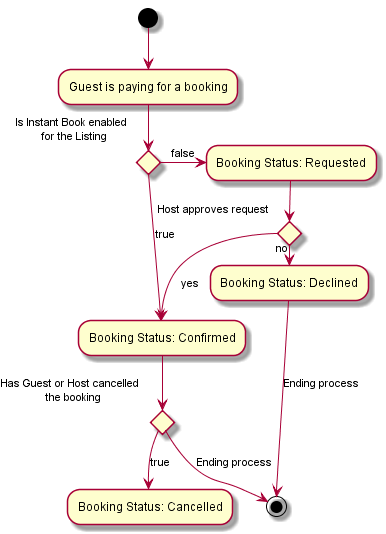
Booking Status
The status field of a booking has one of these values:
- Initiated - The guest started a booking but has not finished paying for it.
- Request - When a guest has paid for a booking on a Listing where instant book is turned off, a request is made to the host to accept or decline the booking.
- Confirmed - When a booking has been paid for either by a instant book, or has been accepted by a host when a booking request has been made.
- Declined - When a request for a booking has been declined by the host.
- Cancelled - When a request for a booking is cancelled.
What is 'Instant Book'?
- Plum Guide Listings are set to either ‘Instant Book’ or ‘Request to Book’.
- This is set during Host Onboarding and can be changed in the Plum Host dashboard (extranet).
- A listing on Instant Book will automatically have its calendar blocked and Booking Status move to ‘Confirmed’ upon a successful payment being taken.
Can I get notified of booking status changes?
Yes. You can receive Bookings Webhooks, or poll the GET Booking Activities endpoint.
Can I retrieve guest billing information?
- No, Plum Guide is the merchant of record for all guest payments (we take all guest payments), so we do not share Guest billing details with Hosts.
How do I retrieve guest contact details?
Guest proxy email addresses are included in the GET Booking endpoint.
We use proxy email addresses for property managers to communicate with guests.
This email address can be used through any email client / Property Management System system, and will also log the conversation in The Plum Guide Host dashboard.
Where can I retrieve bookings for a property manager?
You can get a list of all bookings for all listings that a property manager or host has on Plum Guide via the API in the Bookings endpoint.
Can I view what the expected Host Payout will be in the API?
You can view the host payout in the GET Booking endpoint.
This Host Payout value is calculated at the point of booking. There are 2 things that can happen post-booking that would change the payout value:
- A Listings first check-in will trigger the Plum Host Onboarding Fee which will automatically be deducted from that payout. The Host Onboarding fee is part of the standard agreement between Plum Guide and a Property Manager.
- If a cancellation fee is due to Plum Guide from a Property Manager, the Property Manager can choose to have this deducted from their next payout. Cancellation Fees are part of the standard agreement between Plum Guide and a Property Manager.
Can I be notified of booking activity changes
Yes. These are in the GET Booking Activities endpoint, in the bookingActivityType field.
To sync bookings, poll this endpoint with the time of your last successful poll, then fetch each booking it returns. Do not poll the list of all bookings: it returns every booking each time. In v1, the same feed is GET Booking Activities v1. For booking webhooks, set them up with the v2 webhook endpoints. They work whichever API version you use.
The description of the activities is as follows:
- Requested - Booking has been paid for (Instant Book is turned off) and the host is yet to accept or decline.
- Declined - When a booking has been declined by the host.
- Approved - When a booking has paid and a request has been accepted by a host.
- InstantBooked - When a booking is made via Instant book
- Cancelled - When a booking has been cancelled